
Communications → Settings uses the Settings icon and is distinct from Admin → Communications telephony/messaging configuration. The top Save persists only receipt-prompt enablement and location/register exclusions. Sync now runs immediately. Embedded Customer Sources and reason managers use separate writes. Current shopping-reason create/edit is defective because the save handler references undefined sortOrder before mutation; do not promise those edits until product code is corrected and retested.
Before you beginConfirm the operating line or sender, the customer match, and the intended recipient before sending or calling.
Step by step
- Go to Communications → Settings, identified by the Settings icon. Confirm the Interaction settings heading and intended business; this page manages interaction-study prompts/options, not phone-number ownership, call routing, inboxes, recording, or SMS compliance.
- Understand the four save boundaries before editing: Show receipt interaction suggestion plus location/register switches are drafts saved by the top Save; Sync now is an immediate server action; Customer Sources create/edit/order/deactivate independently; shopping/no-purchase option actions write independently when functional.
- Show receipt interaction suggestion defaults on when no stored setting exists. Turning it off globally suppresses the configured receipt suggestion regardless of location/register lists, but the change remains local until Save.
- Receipt suggestions are eligibility helpers, not automatic interaction submissions. The completed-sale dialog can offer one-tap Log interaction for completed, parked, saved, on-account/bill-to-account, layaway completed, and limited layaway states when the sale has an ID and an interaction callback.
- The same helper also influences receipt badges and Dashboard → Interaction reports to finish. Disabling a prompt changes visibility/queue inclusion, not existing interaction records, primary_interaction_id, receipt data, or report history.
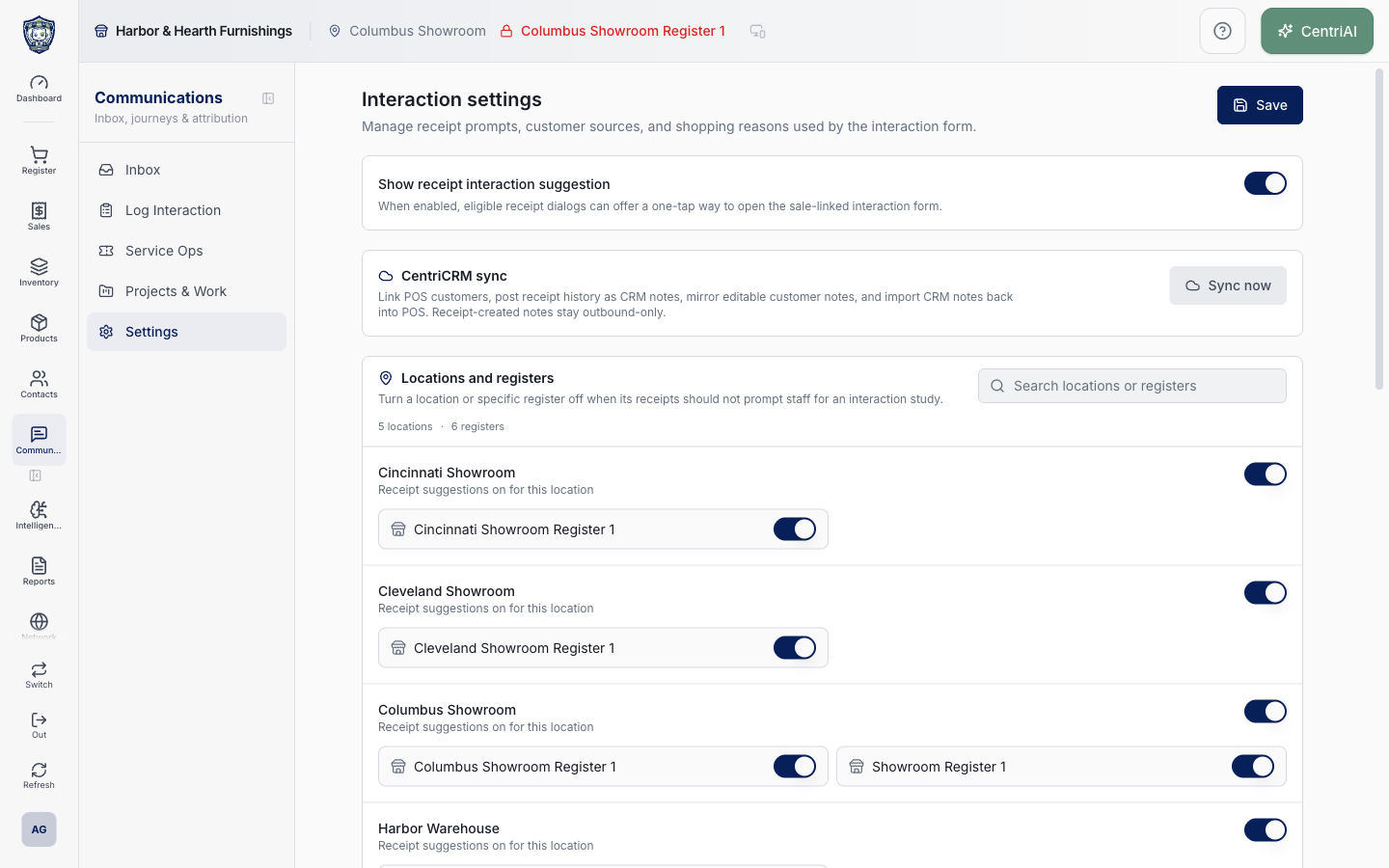
- Under Locations and registers, only active locations are displayed, with all registers attached to those locations. Search matches a location name or any register name; when only the register matches, the parent location remains visible with matching registers. Search is display-only.
- Turn a location off to suppress receipt suggestions for every receipt at that location. Its register switches become disabled and display off, while their individual disabled IDs remain in the draft; re-enabling the location restores the prior per-register state.
- Turn an individual register off only when the parent location is enabled. Prompt resolution checks global enabled first, then disabled location ID, then disabled register ID. A receipt without a location/register ID cannot be excluded by that missing scope and follows the remaining settings.
- Inactive locations are hidden from this editor but are still part of the loaded known-location set used when Save filters IDs. Save removes stored IDs that no longer correspond to any known location/register, then writes the full enabled and disabled-ID lists through the receipt-prompt settings operation.
- Choose the top Save once and wait for Interaction receipt suggestions updated. It invalidates settings, receipt print context, and prompt caches. Reopen the page and confirm the global, location, and register state before testing a receipt.
- Test with representative receipt states at an enabled location/register and each excluded scope. Confirm the completed-sale receipt prompt, Sales History interaction badge/action, and Dashboard Interaction reports to finish. A hidden suggestion does not prevent staff from opening the Post-Interaction Form directly.
- Under CentriCRM sync, read the direction carefully: link POS customers; post receipt history as CRM notes; mirror editable customer notes; import CRM notes back into POS; and keep receipt-created notes outbound-only. This is data synchronization, not merely a status check.
- Sync now immediately invokes sync_pos_to_crm with caps of 100 customers, 25 receipts, 50 outbound customer notes, and 50 inbound notes. It also requests delete_missing_crm_notes true, allowing local imported CRM notes missing from the CRM result to be deleted. Confirm integration ownership, data retention, and backups before running it.
- Choose Sync now once and wait. The result reports linked contacts, posted receipt notes, posted customer notes, imported CRM notes, and a count needing review. “Finished” can include per-record errors; inspect the detailed integration/activity evidence rather than treating the toast as complete reconciliation.
- Do not click Sync now repeatedly while pending. A bounded run may not cover every customer/receipt/note in a large tenant; use approved operational tooling/support to continue or diagnose rather than assuming one click is exhaustive.
- After sync, verify sample POS customer ↔ CRM contact linkage, receipt-note direction, editable customer-note mirroring, inbound CRM-note import/deletion behavior, attribution, timestamps, and duplicates. Never expose CRM tokens or private note content in screenshots/support messages.
- The embedded Customer Sources section is the same attribution system documented under Admin → Contact sources: names, descriptions, enabled state, ordering, deactivation, and Post-Interaction picker behavior use separate database writes and are not saved by the top Save.
- Review Customer Sources before changing them. Disabled sources remain historical but disappear from supported new-selection pickers; reordering/editing has known sort-order caveats. Verify the Post-Interaction Customer source picker after each independent change.
- Main shopping reasons populate the Main shopping reason field. Left without purchasing reasons populate the reason field for no-purchase outcomes. Rows can display Name, Description, Enabled/Disabled, Default, order, Pencil, and Trash/deactivate controls.
- Current defect: New/Edit reason handleSave passes an undefined sortOrder variable. The resulting ReferenceError is caught and shown as Failed to save <reason>; no create/update mutation is sent. Do not keep retrying, claim success, or work around it with duplicate entries. Escalate the product defect and retest after code repair.
- Existing reason rows can still be reordered by drag when they have database IDs. Drag end writes manual order values beginning at 10,000 in 10-point increments; failures restore the prior local order and show Failed to save display order. Verify the actual form order.
- Trash on an existing shopping/no-purchase reason does not hard-delete. It immediately sets is_enabled false and shows deactivated; there is no confirmation. Historical references remain, but the option is removed from enabled form choices.
- The reason dialog’s Default behavior is intended to clear other defaults in the same group before saving the selected one. Because create/edit currently fails before mutation, do not assume a newly selected Default persisted. Existing stored defaults remain as loaded.
- If the page shows No active locations found, No locations/registers match, no sources, or no options, treat each as a scoped completed empty state after loading. Do not infer tenant-wide absence from a search-filtered result.
- Harbor & Hearth’s real Amelia Grant screenshot shows the fully loaded /interactions/settings page at 1440×900 with visible location/register prompt configuration only. No switch, Save, CRM sync, source, option, or reorder action was invoked; no customer, receipt, CRM note, token, or private content is exposed.
Screen and contract reference
| Control or area | What it means |
|---|---|
| Settings icon | Exact Communications navigation icon for Interaction settings. |
| Top Save | Persists only receipt-prompt global/location/register settings. |
| Show receipt interaction suggestion | Global draft gate; defaults on when absent. |
| Disabled location IDs | Suppress prompts for every register/receipt at that location. |
| Disabled register IDs | Suppress prompts for one register when its location is enabled. |
| Prompt resolution | Global enabled → location exclusion → register exclusion. |
| Eligible receipt dialog | Supported completed/saved/account/layaway receipt states with sale-linked interaction action. |
| Sales History badge | Uses prompt settings but existing submitted interactions remain visible. |
| Interaction reports to finish | Dashboard queue filtered by prompt scope and missing primary interaction. |
| Search locations or registers | Display-only parent/register matching. |
| Inactive location boundary | Hidden in UI; Save still validates IDs against all loaded known records. |
| Sync now | Immediate bounded CentriCRM sync, separate from top Save. |
| Sync caps | 100 customers, 25 receipts, 50 outbound notes, 50 inbound notes. |
| delete_missing_crm_notes | Manual sync requests deletion of imported local CRM notes no longer returned from CRM. |
| Outbound-only receipt notes | Receipt-created CRM notes are not imported back into POS. |
| Customer Sources | Embedded independent attribution manager; not part of top Save. |
| Main shopping reasons | Options for the interaction form’s primary buying reason. |
| No-purchase reasons | Options used when the customer leaves without buying. |
| Current reason-save defect | Undefined sortOrder causes create/edit to fail before database mutation. |
| Drag reorder | Existing database rows saved at manual sort values beginning 10,000. |
| Trash/deactivate | Immediate is_enabled=false, not hard delete. |
| Default option | Intended one-per-group behavior; new edits cannot currently persist due defect. |
| Harbor & Hearth screenshot | Real Amelia Grant Interaction settings capture; read-only visible scope with no customer/CRM data or mutations. |
Expected result
The intended receipt prompts, CentriCRM sync behavior, and per-location or register settings are saved and reflected in one controlled interaction.
Troubleshooting
- Confirm the operating line, sender identity, customer match, and recipient before sending.
- Review the conversation or interaction log before repeating an outbound message.
- Check browser microphone and notification permissions when calls or alerts do not work.
CentriPOS API explorer · API Center administration
More guides
Build an itemized payment in MoneyUse Products or Amount & description to build one receipt, attach the customer, and follow the appropriate payment or service-estimate workflow.
Take a one-time payment in Virtual TerminalReview a one-time amount, tax and contact at the correct payment station, use its verified secure checkout, and recover the original receipt after an uncertain result.
Review booking payments, refunds and earned careKeep a booking’s customer payments, unused advances, completed care, cancellation fees and refunds distinct, then read a correctly scoped accrual report.
Configure booking properties and customer pagesSet accommodations, service packages, availability, required intake and payment terms, then review the correctly branded booking page before sharing it.