
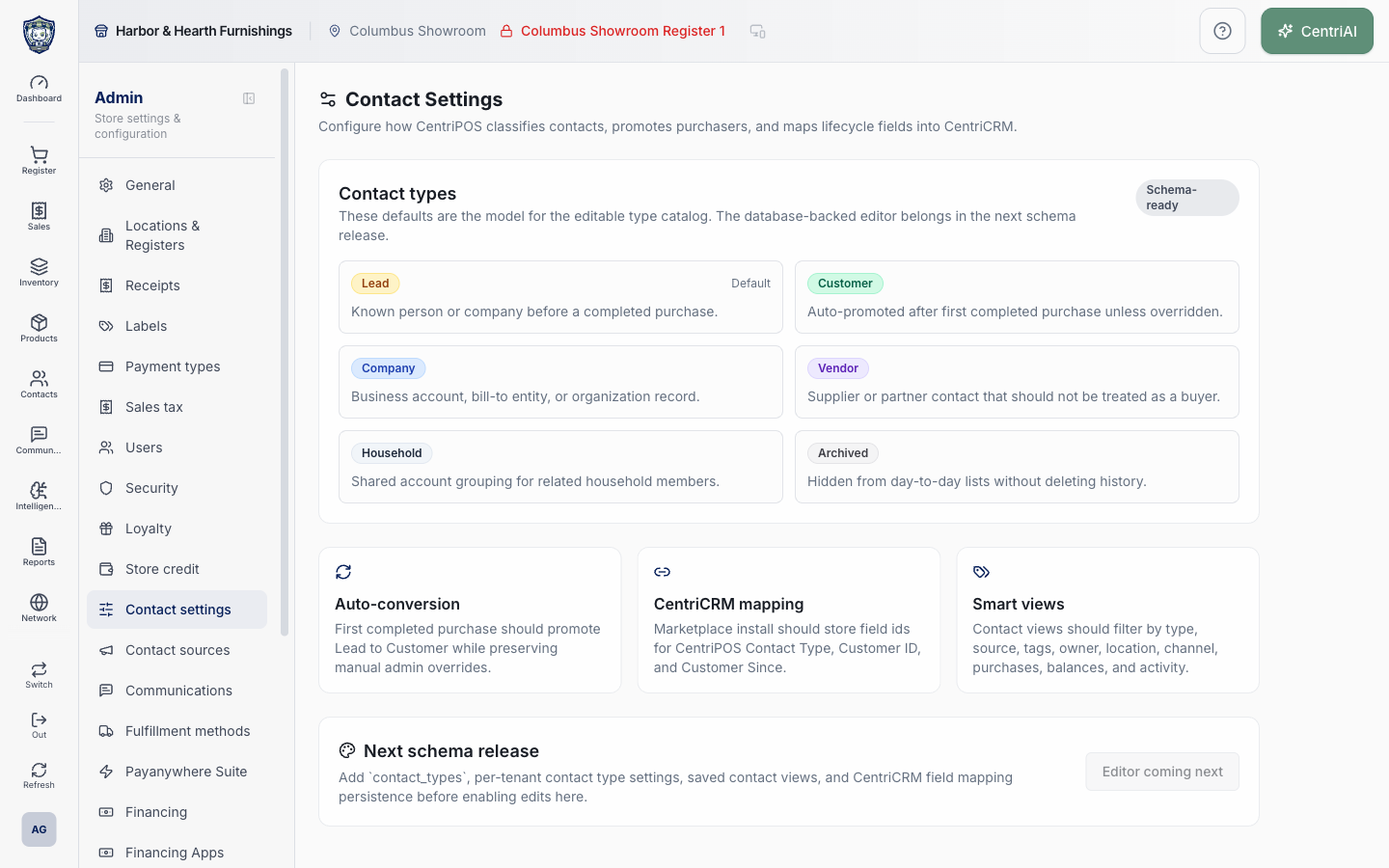
Admin → Contact settings uses the Sliders Horizontal navigation icon; the page heading itself uses the Settings 2 icon. The Amelia Grant Harbor & Hearth route is a fully loaded, read-only Schema-ready preview. Its wording describes the model intended for a future database-backed editor and must not be treated as proof that contact types, automatic conversion, saved views, or CRM field mappings are active.
Before you beginUse an authorized administrator account and confirm the business shown in the top bar. Record the previous value before changing a live operational setting.
Step by step
- Go to Admin → Contact settings using the Sliders Horizontal icon. Confirm /admin/contact-settings loads the Contact Settings heading with the Settings 2 icon and the description about classification, purchaser promotion, and CentriCRM lifecycle mapping.
- In Contact types, read the Schema-ready badge and its boundary: these six cards are defaults for the editable type catalog, while the database-backed editor belongs in the next schema release. The cards are reference content, not selectable rows.
- Read Lead: Known person or company before a completed purchase. Lead alone carries the Default marker in this preview. There is no visible control to change the default.
- Read Customer: Auto-promoted after first completed purchase unless overridden. The wording describes intended behavior; this screen contains no switch, rule editor, event history, or test control that proves conversion is executing.
- Read Company: Business account, bill-to entity, or organization record. Read Vendor: Supplier or partner contact that should not be treated as a buyer. These cards do not create, merge, or reclassify actual company or supplier records.
- Read Household: Shared account grouping for related household members. Read Archived: Hidden from day-to-day lists without deleting history. These are model descriptions, not actions on a customer or association.
- Read Auto-conversion: First completed purchase should promote Lead to Customer while preserving manual admin overrides. The word should is future-model language. Verify any real contact lifecycle from the customer record and activity evidence rather than assuming this preview changed it.
- Read CentriCRM mapping: Marketplace install should store field ids for CentriPOS Contact Type, Customer ID, and Customer Since. No marketplace connection, field picker, identifier, synchronization status, or Save action appears here.
- Read Smart views: Contact views should filter by type, source, tags, owner, location, channel, purchases, balances, and activity. This card does not create a view or confirm those dimensions are currently filterable together.
- Read Next schema release. It explicitly calls for contact_types, per-tenant contact-type settings, saved contact views, and CentriCRM field-mapping persistence before edits are enabled. The visible Editor coming next button is disabled.
- Do not search for hidden edit affordances or attempt to persist changes from this page. There are no active inputs, add/delete/reorder controls, color selectors, mappings, Save/Cancel actions, or editable tenant overrides.
- Use the live Contacts, Companies & households, Vendors/Suppliers, and CentriCRM-supported workflows for current operations, and verify their behavior independently. If an editable Contact Settings feature was expected contractually, contact support with the tenant, route, visible Schema-ready state, and expected control—without customer data or CRM secrets.
Screen and contract reference
| Control or area | What it means |
|---|---|
| Sliders Horizontal icon | Exact Admin navigation icon for Contact settings. |
| Settings 2 icon | Icon displayed beside the Contact Settings page heading. |
| Schema-ready | Badge identifying the current contact-type model as a schema preview rather than an editable catalog. |
| Lead / Default | Reference type for a known person or company before purchase; the preview marks it as default without exposing a default selector. |
| Customer | Reference type described as auto-promoted after first completed purchase unless overridden. |
| Company | Reference type for a business account, bill-to entity, or organization. |
| Vendor | Reference type for a supplier or partner that should not be treated as a buyer. |
| Household | Reference type for a shared grouping of related household members. |
| Archived | Reference type intended to hide a record from day-to-day lists without deleting history. |
| Auto-conversion | Future-model statement about Lead-to-Customer promotion; no active configuration or proof of execution appears here. |
| CentriCRM mapping | Future-model statement naming CentriPOS Contact Type, Customer ID, and Customer Since field IDs; no connector or field controls appear here. |
| Smart views | Future-model dimensions: type, source, tags, owner, location, channel, purchases, balances, and activity. |
| Next schema release | Explicit prerequisite list for contact_types, tenant settings, saved views, and CRM mapping persistence. |
| Editor coming next | Disabled button confirming the editor is unavailable in the current screen. |
| No Save action | Nothing on this route writes contact configuration today. |
| Harbor & Hearth screenshot | Real Amelia Grant capture of the loaded schema-preview state; it exposes no customer records, CRM field identifiers, or editable settings. |
Expected result
The screen accurately documents the current contact-type model and planned conversion, CentriCRM mapping, and smart-view behavior without implying that the future editor or persistence controls are already available.
Troubleshooting
- Confirm you are changing the intended business and location before saving.
- Record the previous setting when a change affects live selling, payments, tax, or integrations.
- Use a controlled test record after saving before rolling the setting out broadly.
CentriPOS API explorer · API Center administration
More guides
Build an itemized payment in MoneyUse Products or Amount & description to build one receipt, attach the customer, and follow the appropriate payment or service-estimate workflow.
Take a one-time payment in Virtual TerminalReview a one-time amount, tax and contact at the correct payment station, use its verified secure checkout, and recover the original receipt after an uncertain result.
Review booking payments, refunds and earned careKeep a booking’s customer payments, unused advances, completed care, cancellation fees and refunds distinct, then read a correctly scoped accrual report.
Configure booking properties and customer pagesSet accommodations, service packages, availability, required intake and payment terms, then review the correctly branded booking page before sharing it.