
Reports → Market Intelligence uses the Compass icon. The current screen is location-specific; it does not contain the older Network scope, arbitrary reporting-period, comparison-period, Today’s Market Brief, Do next, or Watch list controls. It reads up to 10,000 sales from the selected location’s latest 18 months and customer details for at most the first 1,000 distinct attached customer IDs. Public demographics, competition counts, map positions, fit scores, and local Ask Centri answers are estimates derived from the loaded evidence—not CentriPOS ledger totals or guaranteed expansion outcomes.
Step by step
- Open Reports → Market Intelligence beside the Compass icon. The page heading is Customer reach, surrounding market, and expansion fit. Confirm the active CentriPOS business, then choose one active Location. There is no All locations or network-wide option on this screen.
- Choose Business type. This sector/niche lens changes like-business competition searches, prompts, score interpretation, and labels. It does not rewrite product categories or the tenant’s legal industry classification. Reconfirm it before comparing markets.
- Understand the fixed source window. Sales analyzed uses up to 10,000 tenant sales created during the last 18 months at the selected location. Known customers counts sales with attached customer records. The customer lookup requests at most the first 1,000 distinct attached customer IDs, so a high-volume location can have incomplete address enrichment even when more sales were loaded.
- Read the four top metrics together. Sales analyzed is the loaded sale count. Known customers is attached-customer coverage. Demographic-ready is the percentage/count of known customers with ZIP or street-address evidence. Revenue mapped is revenue available to the active customer/ZIP profile; it is not necessarily the location’s audited net sales total.
- Use the five tabs: Command center, Active reach, Surrounding market, Market map, and Expansion finder. Changing tabs does not change the location, business type, ACS year, candidate ZIP input, or already loaded evidence during the mounted session.
- Choose ACS year · ZCTA. ZCTA means Census ZIP Code Tabulation Area—a ZIP-like statistical geography, not a postal delivery boundary. The screen uses ACS five-year estimates because they are the stable small-area Census product. Choose Refresh Census to force a new demographic refresh for the store ZIP, up to five strongest customer ZIPs, and comma-separated candidate ZIPs. Cached results otherwise remain fresh for 15 minutes in the client query.
- On Command center, read Data readiness, Market fit, and Expansion signal as model scores from the current evidence. Data readiness asks whether address coverage can support the comparison. Market fit compares the store market with the strongest customer seed. Expansion signal reflects the best ranked candidate. A dash means the required evidence is not available.
- Review up to five Recommended operator moves. A high-priority badge reflects the local command-center rules, not an assigned task or guaranteed revenue action. Use ZIP opportunity overlay to compare up to six strongest customer ZIPs, mapped revenue share, population, and median household income.
- Use Ask Centri market workbench to type or choose a prompt about revenue ZIPs, conversion gaps, competition, expansion, or readiness. The answer and Evidence list are generated locally from the current loaded snapshot. Ask Centri active means the plan is entitled and the evidence packet is Gemini-ready; this component still displays the deterministic local answerer until governed routing/metering is connected.
- On Active reach, review Revenue by active customer ZIP, Highest-value ZIPs, and ZIP conversion gaps. A sale ZIP is resolved from customer ZIP, customer address/street address, delivery address, then customer display contact. Completed includes completed, bill-to-account, layaway-completed, and on-account statuses; parked_abandoned is abandoned; draft, parked, posted, and saved are saved; other statuses are excluded from the conversion-gap buckets.
- Read a positive ZIP conversion gap as mapped saved plus abandoned opportunities outnumbering completed sales in that ZIP. Open opportunity value uses sale subtotal when present, otherwise total. This is a demand/follow-up signal, not proof those opportunities are recoverable or that completion attribution is error-free.
- On Surrounding market, inspect Store ZIP baseline: population, median household income, age 25–44, bachelor-or-higher, no-vehicle households, median age, households with children, owner occupancy, and supported race/ethnicity estimates. If the location address has no ZIP, add a correct location ZIP before expecting a store baseline.
- Treat ACS figures as public survey estimates with source year, sampling uncertainty, and ZCTA boundaries. Do not use a demographic or race/ethnicity percentage to make discriminatory customer, credit, pricing, employment, housing, or service decisions. Use aggregated planning and accessibility context with qualified review.
- Review the local comparison and Competition lens. Like-business counts come from cached Google Places searches for the current niche. A failed competition refresh or zero count can mean provider/key/coverage limits rather than no competitors. Competition data is cached for 15 minutes in the client query.
- In Surrounding area ZIP checker, enter five-digit ZIPs separated by commas. The parser keeps unique ZIPs and combines them with the store ZIP and up to five strongest customer ZIPs. Choose Refresh ZIP data to force Census, competition, and map-coordinate refresh together. Review each comparison row’s customer reach, demographics, competition, and saved state.
- On Market map, understand the visual: it is a custom relative ZIP-centroid plot, not a street map or drive-time/territory boundary. Blue identifies the store ZIP, dark identifies customer/candidate ZIPs, and green identifies saved growth-plan ZIPs. Minus/Plus changes visual zoom from 80% through 240%; it does not change analysis radius or source queries.
- Choose Refresh map to force ZIP centroid refresh. When coordinates cannot load, the screen points to the platform Google Maps/Places key. Select a pin to inspect mapped revenue, customers, population, like-business count, median household income, and age 25–44. Missing values show absence of loaded evidence, not zero.
- Choose Save on a selected ZIP to upsert a location-specific growth-plan watchlist record. The store ZIP starts at priority 5; other new ZIPs receive decreasing priorities based on current list length, no lower than 1. Choosing Saved deletes that bookmark immediately. There is no confirmation dialog, note/status editor, or undo control on this screen.
- Use Growth plan trajectory to open saved ZIPs in stored priority/created order and review current enriched evidence. Saving a ZIP does not launch a campaign, create a task, approve a site, or preserve the demographic/competition snapshot; the row is re-enriched from current loaded data.
- On Expansion finder, enter candidate ZIPs or choose up to five Recommended ZIP seeds from the store and strongest customer markets. Statewide scan is described as future behavior; only explicitly entered ZIPs are ranked today.
- Read Candidate market ranking as a relative fit score. It compares each candidate’s Census population, median household income, education, age 25–44, and current like-business count against the strongest active customer ZIP (or store baseline) using the selected category model. Review Signals and Risks; Neutral fit means no modeled positive/negative flags, not that the site is safe or profitable.
- Before acting, verify the location address, customer ZIP/address capture, sale statuses, 18-month and row caps, selected ACS year, Census refresh state, business type, Google Places freshness, map coordinates, strongest seed, and explicitly entered candidates. Validate any expansion, marketing, accessibility, or investment decision with current local research, costs, legal review, site visits, and independently sourced market data.
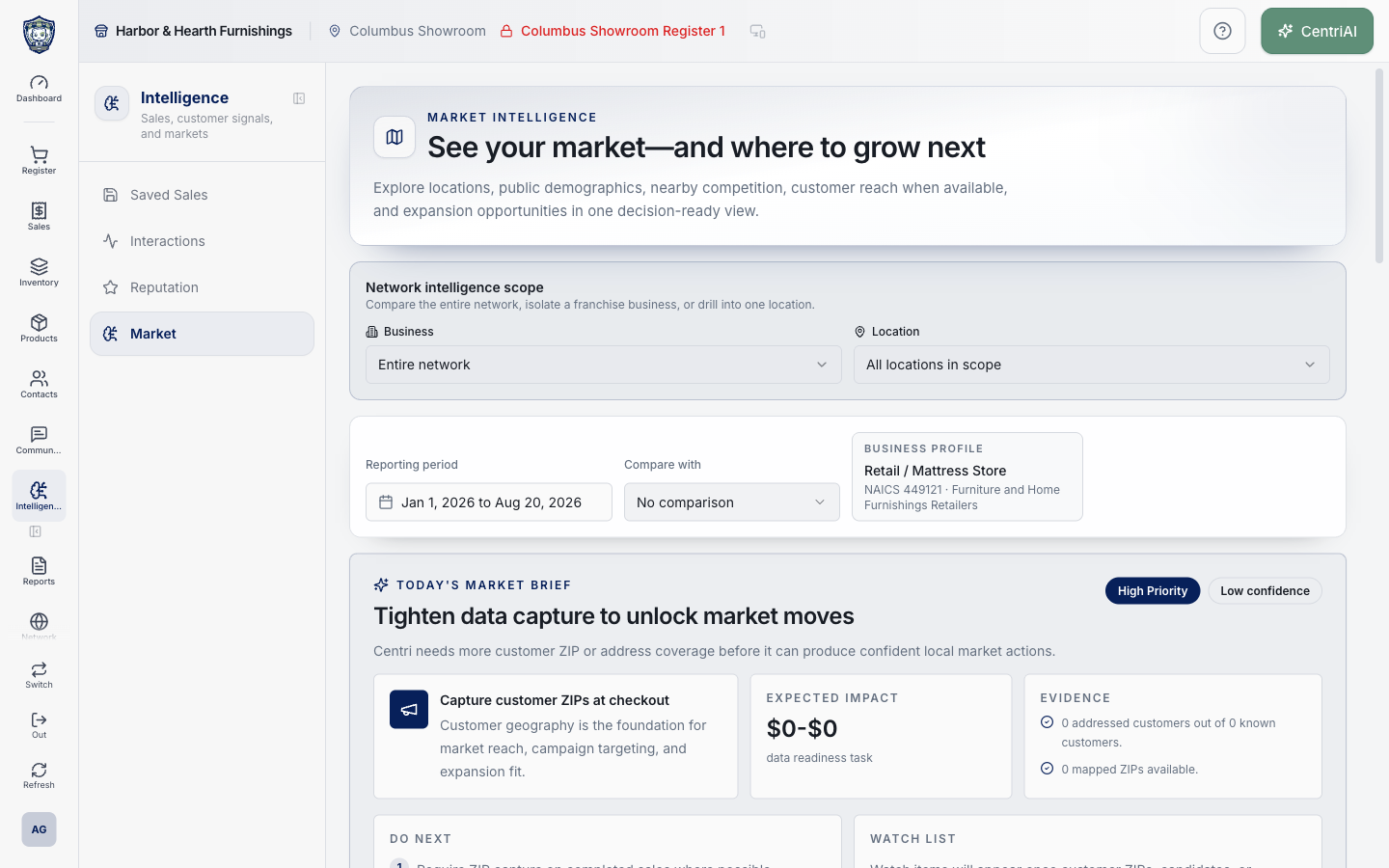
- The published screenshot is the real Amelia Grant Harbor & Hearth /dashboard/market-intelligence screen at 1440×900 in a fully loaded state. It is attached only to this exact guide; no customer-level address, private message, credential, or state-changing action was captured.
Screen and contract reference
| Control or area | What it means |
|---|---|
| Compass icon | Exact CentriPOS Reports navigation icon for Market Intelligence. |
| Location | One active location; there is no All/network scope in the current screen. |
| Business type | Sector/niche lens for competition, prompts, scoring, and labels. |
| Sales analyzed | Up to 10,000 selected-location sales created in the latest fixed 18 months. |
| Known customers | Loaded sales with an attached customer ID; customer enrichment is limited to the first 1,000 distinct IDs. |
| Demographic-ready | Share and count of known customers with ZIP or street-address evidence. |
| Revenue mapped | Revenue represented in the active customer/ZIP profile; not an audited location net-sales KPI. |
| Command center | Readiness, market-fit, expansion-score, recommended moves, ZIP overlay, and local Ask Centri evidence. |
| Active reach | Customer-ZIP revenue and completed-versus-saved/abandoned conversion evidence. |
| Surrounding market | Store/candidate Census baselines, local comparison, competition, and ZIP checker. |
| Market map | Relative cached ZIP-centroid plot plus location growth-plan bookmarks. |
| Expansion finder | Explicit candidate-ZIP scoring against the strongest active customer/store profile. |
| ACS year · ZCTA | Selected ACS five-year source year and Census ZIP-like statistical geography. |
| Refresh Census | Forces demographic refresh for the current ZIP evidence set. |
| Data readiness | Model score for address/evidence sufficiency. |
| Market fit | Modeled similarity between store-market and strongest active-customer demographic seed. |
| Expansion signal | Modeled strength of the top explicitly entered candidate. |
| Recommended operator moves | Up to five rule-generated suggestions; not assigned tasks or guaranteed impact. |
| Ask Centri market workbench | Deterministic local answer/evidence from the loaded snapshot; entitlement badge describes governed AI readiness. |
| ZIP resolution order | Customer ZIP → customer address → customer street address → delivery address → customer display contact. |
| Completed conversion bucket | completed, bill_to_account, layaway_completed, and on_account. |
| Abandoned conversion bucket | parked_abandoned. |
| Saved conversion bucket | draft, parked, posted, and saved. |
| ZIP conversion gap | Saved + abandoned count minus completed count for mapped eligible statuses. |
| Store ZIP baseline | ACS/ZCTA demographic estimates for the ZIP parsed from the selected location address. |
| Competition lens | Cached Google Places like-business count for the selected niche and ZIP. |
| ZIPs to compare / Candidate ZIPs | Comma-separated unique five-digit ZIP input. |
| Refresh ZIP data | Forces Census, competition, and map-coordinate refresh. |
| ZIP target map | Relative centroid visualization; not street geography, radius, drive time, or territory. |
| Map − / + | Visual zoom only, from 80% to 240%. |
| Refresh map | Forces ZIP centroid/provider refresh. |
| Save / Saved | Immediate location-specific growth-plan watchlist upsert or delete with no confirmation. |
| Growth plan trajectory | Saved ZIP list re-enriched from current evidence; not a frozen plan snapshot or campaign. |
| Candidate market score | Relative category-model fit using public demographics and current competition count. |
| Signals / Risks / Neutral fit | Model explanations, not guarantees or approvals. |
| Harbor & Hearth screenshot | Real fully loaded Amelia Grant Market Intelligence screen matched to /dashboard/market-intelligence. |
Expected result
The displayed market area, period, sources, benchmarks, and business comparisons match the intended location context and clearly distinguish estimates from CentriPOS transaction data.
Troubleshooting
- Check the date range, timezone, locations, registers, statuses, and saved-view filters first.
- Refresh after the underlying transaction has finished posting.
- Open the source sale, payment, movement, or closure when a total needs transaction-level proof.
CentriPOS API explorer · API Center administration