
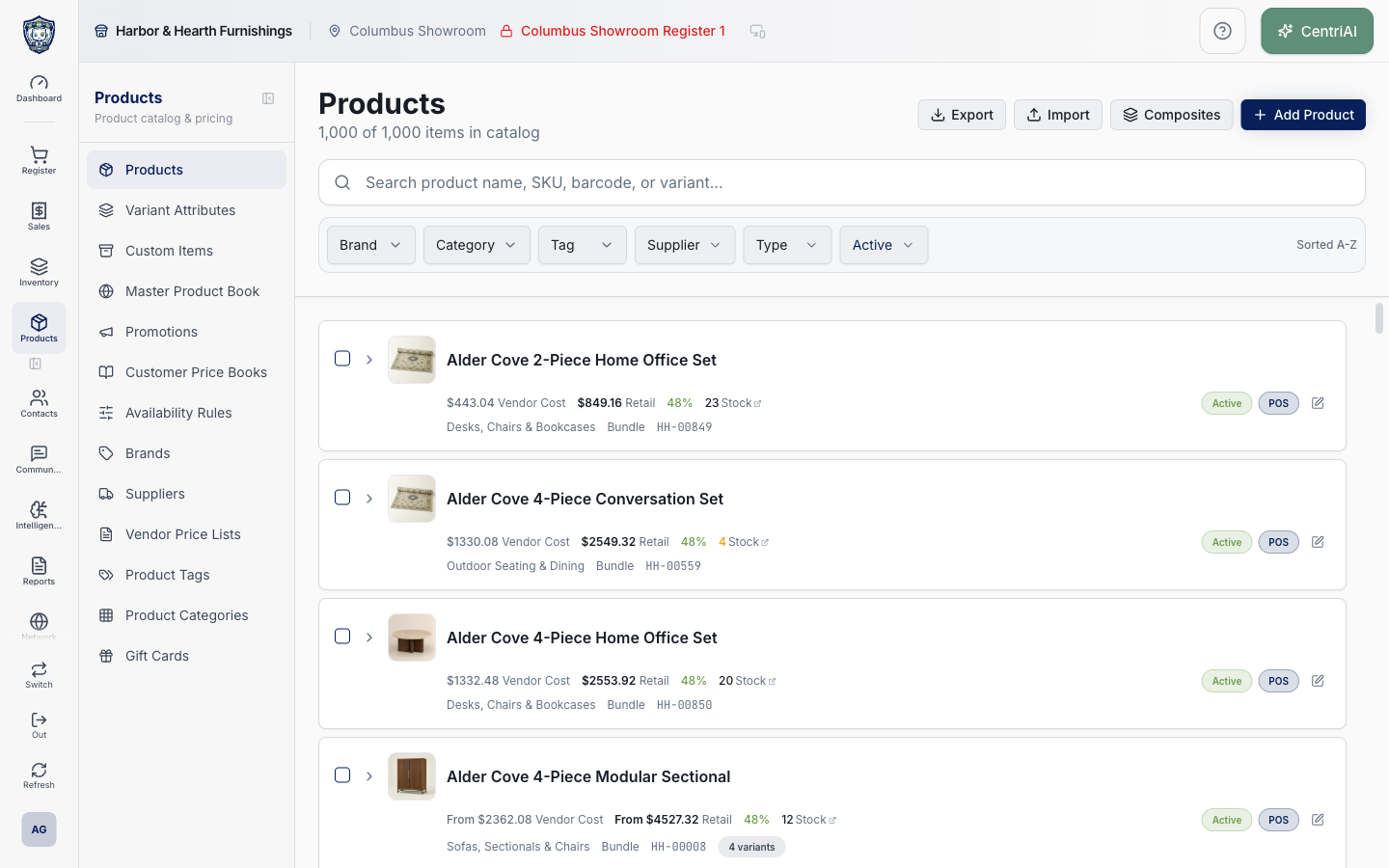
Products → Products uses the Package icon. The page loads active and inactive products for the current tenant, then filters and sorts them in the browser. Search/filter values are shareable URL state, but selection and expanded rows are local state. Several controls mutate records immediately. Export always writes every loaded product—not only the filtered/selected rows—and includes supply price even when the screen hides costs. Import, Composites, and network Publish appear only for an enterprise/HQ tenant; network Publish is distinct from the selected-product Online Store actions.
Step by step
- Go to Products → Products, identified by the Package icon. Confirm the active CentriPOS business and read “<filtered> of <total> items in catalog.” The default Status is Active, so the first number can be smaller than the total even before you type a search.
- Wait for the product loader to finish. No products match your search appears when a nonblank search produces zero rows. No products yet can also mean the current filters produce zero rows, not necessarily that the tenant has no loaded products; choose Clear filters and All products before concluding the catalog is empty.
- Search product name, product SKU, barcode, variant name, variant SKU, variant supplier code, or variant attribute values. Every whitespace-separated token must occur somewhere in the combined lowercased product/variant text, but the tokens do not need to occur in the same field or variant.
- Use Brand, Category, Tag, Supplier, Type, and Status filters. Multiple selections within Brand/Category/Tag/Supplier use any-match logic; different filter groups all must pass. Supplier matching comes from supplier price-list entries, not only a product’s visible base vendor field.
- Type supports Standard, Variable, and Bundle (stored as composite). Status supports All products, Active, Inactive, POS enabled, POS disabled, Published online, and Not published. Not published means publish_status is anything other than exactly `published`, including hidden and missing values.
- Variant filters can arrive in the URL as repeated `variantAttribute` and `variant` values. Attribute filters require one variant to contain every selected attribute key. Value filters require one variant to match every selected attribute/value pair exactly after lowercase normalization. The visible chips can be cleared separately with Clear variant filters.
- Understand URL persistence. Search uses `q`; Brand, Category, Tag, Supplier, Type, Variant, and Variant Attribute can repeat; nondefault Status is stored. Opening/closing a product editor preserves these list parameters and attempts to restore the prior product/scroll position. A shared URL does not grant catalog permissions.
- Choose Clear filters to reset search, all catalog/variant filters, and Status to Active. The list is always sorted by product name A–Z using case-insensitive natural numeric order, then SKU; “Sorted A-Z” is informational and has no alternate list-sort control.
- Read a product card. It can show image, name, minimum enabled-variant retail price as From, permission-sensitive minimum enabled-variant vendor cost, displayed margin, stock, category names, Standard/Variable/Bundle type, SKU, Inactive, HQ source, variant count, and a franchisee-only recommended retail price.
- Cost and margin are hidden when the profile’s cost-visibility permission says to hide them. Do not treat an absent cost as zero. Export currently still includes supply_price and calculated margin for all loaded products regardless of this card-level hideCosts state, so only authorized users should export and the downloaded file must be protected.
- For a variable product, card Retail and Vendor Cost use the minimum positive retail/supply price among enabled variants when present; “From” indicates that rollup. The displayed margin combines those two minima even if they come from different variants. Inspect the expanded variant/product detail before pricing decisions.
- Stock follows the active app location ID when present; otherwise it sums location_stock across all returned locations. An untracked item shows ∞ Stock. A tracked quantity below 10 is styled as warning, but 10 is only this visual threshold—not a configured reorder rule. Choose the Stock link to open Live Inventory expanded to the product.
- Choose the row or chevron to expand the embedded Product Quick View. Cost-visible users can select Base cost or returned supplier price-list cost bases there; missing retail/base/selected cost, no price book, low margin below 35%, and 50%+ margin are diagnostic badges, not automatic price changes.
- Choose Edit to open `/catalog/products/<product ID>` while preserving list search. Add Product opens `/catalog/products/new`. Save/cancel behavior belongs to the product editor; returning to the list attempts to center the edited product or restore prior scroll. Verify the correct ID and persisted record.
- Treat Active/Inactive and POS badges as immediate row actions. Clicking Active toggles `is_active`; clicking POS toggles `sell_pos`; there is no confirmation and no success toast, only an error toast if the update fails. Reload and verify before assuming the catalog or register changed. Active and POS are independent.
- Select product checkboxes only for intentional bulk work. The header checkbox in the bulk bar selects or clears every product in the current filtered result—not every loaded product—based on whether selected count equals filtered count. Existing selections are not automatically cleared when filters change, so the selected count can include products no longer visible. Use Clear selection and rebuild it after any filter change.
- Under Actions → Categories or Tags, Add upserts the selected product relationships and Remove deletes them immediately with no confirmation. Empty option lists mean no categories/tags are available. Wait for Categories updated or Tags updated, then inspect representative selected products.
- Under Actions → Online Store, Publish online sets publish_status `published` and sell_online true. Unpublish (draft) sets `draft` and sell_online false. Set hidden sets `hidden` and sell_online false. These are immediate selected-product database updates with no confirmation; verify the storefront behavior and do not confuse them with network publication.
- Under Actions → Pricing, Enable or Disable custom price at sale immediately updates allow_custom_price for every selected ID. This changes whether authorized checkout users can enter a custom price; it does not set a price, create a discount, or limit by register. Test permissions and receipt/audit behavior with a controlled sale.
- Delete products opens a browser confirmation naming only the selected count. Confirming hard-deletes those product rows. The UI says denormalized sales and inventory history remains with a Deleted note, but there is no restore action. Audit variants, inventory, open/saved sales, online listings, bundles, supplier lists, labels, integrations, and historical reporting before deletion.
- Use Export → XLSX or CSV with care. The export ignores search, filters, and selectedIds and serializes every product in the loaded `products` array. It includes name, SKU, product type, brand, supply price, retail price, calculated margin, inventory/POS/online/active flags, barcode, description, categories, and tags; it omits variant rows, supplier price-list detail, stock quantities, and images.
- The XLSX/CSV export filename is `products-export` and the success message reports the total loaded product count. CSV is written through the workbook library from the same single Products sheet. Check row count and protect cost/barcode/description data before sharing.
- Import and Composites appear only for an enterprise/HQ tenant. Import receives a location map built from every tenant location name with spaces converted to underscores; duplicate normalized names can overwrite one another in that map. Preview and validate a backup/export, location columns, products, variants, warnings, and counts before any controlled import.
- Network Publish appears only for enterprise/HQ with child tenants. Choose one franchisee or All franchisees, then Publish. All runs one RPC sequentially per child and sums returned counts; a later failure does not roll back earlier franchisees. This is master-catalog synchronization, not online-store publishing. Audit each target and do not retry blindly after partial failure.
- A franchisee product with source_product_id shows HQ and can show HQ recommended retail. That badge does not prove every field is current, locked, or safe to overwrite; inspect Master Catalog/network synchronization rules before local edits.
- Use the real Amelia Grant Harbor & Hearth screenshot to orient to `/catalog/products` at 1440×900. It is the exact loaded Products list capture recorded in the approved manifest. No import, export, bulk mutation, product editor, network publish, deletion, customer, or transaction action was performed for the screenshot.
Screen and contract reference
| Control or area | What it means |
|---|---|
| Package icon | Exact CentriPOS Products navigation/page identity. |
| Filtered of total count | Browser-filtered rows versus every loaded active/inactive product. |
| Search | All whitespace tokens must appear somewhere in combined product and variant search text. |
| Brand / Category / Tag / Supplier | Any-match within each group; all active groups must pass. |
| Supplier filter | Derived from supplier price-list entries. |
| Type | Standard, Variable, or Bundle/composite. |
| Status | All, Active, Inactive, POS enabled/disabled, Published online, or Not published. |
| Not published | Any publish_status other than exactly published, including hidden/missing. |
| Variant Attribute | Requires one variant containing every selected attribute key. |
| Variant value | Requires one variant matching every selected attribute/value pair. |
| URL state | q and repeated filter parameters persist through editor routing. |
| Sorted A-Z | Fixed name natural sort then SKU; no alternate list sort. |
| Vendor Cost / Margin | Permission-hidden on cards but currently still included in export. |
| From price/cost | Minimum positive values among enabled variants; may not represent the same variant. |
| Stock | Active-location quantity when a location exists, otherwise all-location sum. |
| ∞ Stock | Inventory tracking is off. |
| Stock link | Working Live Inventory link expanded to the product. |
| Expand row | Embedded Product Quick View and cost/price-book diagnostics. |
| Edit / Add Product | Route-backed product editor preserving list URL state. |
| Active badge | Immediate is_active toggle with no confirmation/success toast. |
| POS badge | Immediate sell_pos toggle with no confirmation/success toast. |
| Selection | Local set that can retain hidden IDs after filters change. |
| Select all | Current filtered rows only. |
| Categories / Tags | Immediate bulk relationship add/remove. |
| Online Store bulk action | Immediate publish_status and sell_online update for selected IDs. |
| Custom price at sale | Immediate allow_custom_price update for selected IDs. |
| Delete products | Confirmed hard delete with no restore control. |
| Export XLSX / CSV | Every loaded product, not filtered/selected rows; includes supply cost and no variant/stock detail. |
| Import / Composites | Enterprise/HQ-only catalog ingestion workflows. |
| Publish Products to Network | Enterprise/HQ child-tenant RPC, sequential by child for All and nontransactional across targets. |
| HQ badge / recommended retail | Product linked to a source master; not complete synchronization proof. |
| Harbor & Hearth screenshot | Real approved loaded `/catalog/products` capture with no mutation or sensitive workflow opened. |
Expected result
The intended product is identified by product/variant evidence and the active URL filters; displayed price/cost/stock scope is understood, selected IDs are rebuilt after filter changes, each immediate row/bulk mutation is verified on the exact products, exports are treated as all-loaded-product cost-bearing files rather than filtered downloads, and any HQ network publication is audited target by target for partial completion.
Troubleshooting
- Confirm whether you are editing a product, variant, shared master record, or location-specific value.
- Search for an existing product, SKU, UPC, attribute, or tag before creating a duplicate.
- Preview labels, pricing, and availability in the intended location before broad publication.
CentriPOS API explorer · API Center administration