
Products → Promotions uses the Megaphone icon. The current matcher loads only Active promotions whose channel is In store or In store & online, evaluates their schedule/conditions against the Sell cart, and presents each match for staff to manually accept or dismiss. Several editor labels are not fully enforced: Online-only is not loaded by this matcher; Free delivery calculates $0 and does not waive fees; Entire sale excluding delivery is calculated against the full subtotal; promo codes are not required entry codes; Target everyone and Offer loyalty points are stored but not evaluated. Test every rule with exact carts before activation.
Step by step
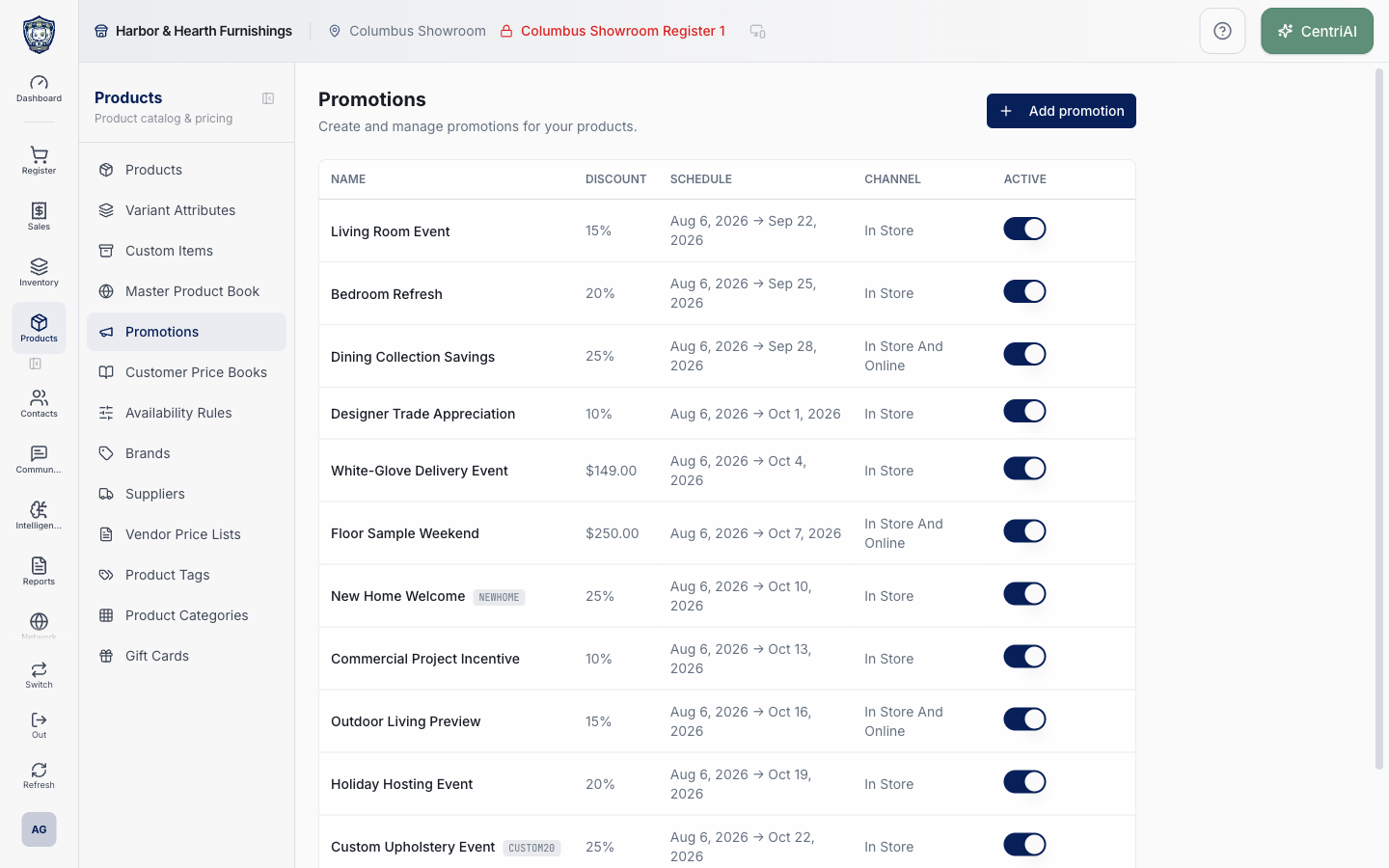
- Go to Products → Promotions. Wait for loading, then review newest-first Name/code, headline Discount, Schedule, Channel, and Active. The real Harbor & Hearth screenshot is a loaded list capture with no editor or active-state changes.
- Do not treat the list headline as the complete rule. For a complex promotion it stores/displays only the first valid action as discount_type/value; open the row to review every IF condition and THEN action.
- Choose Add promotion. Enter a required operational Name, optional uppercase Promo code, and staff Description. Promo code is only stored/displayed; the current Sell flow does not ask the customer/cashier to enter it. When staff manually applies the eligible promotion, the code is appended to the sale note as Promo: <code>.
- Choose Simple for one reward. Select Percentage or fixed tenant-currency value, then Entire sale, Entire sale (excl. delivery), Specific products, Category, Brand, Supplier, or Delivery/Shipping. A positive numeric value is required except Free delivery.
- For product/category/brand/supplier targeting, select at least one exact reference even though the form does not enforce it. Saving an item action with no reference creates a null-target action that the evaluator applies to every cart item. Verify selections after reopening.
- Do not use Delivery/Shipping in production: the saved free_delivery action has value 0, the evaluator only describes Free delivery, and the cart’s promotion discount remains $0. It does not remove the fulfillment fee.
- Do not rely on Entire sale (excl. delivery): the editor writes an exclusion marker, but percent_off_cart/fixed_off_cart evaluation ignores it and the cart applies the promotion against its full line subtotal, including fulfillment-charge lines.
- Choose Complex (If / Then) for multiple conditions/actions. Every saved condition row must pass. Cart total minimum uses subtotal; Cart quantity minimum sums item quantities; contains conditions check selected product/category/brand/supplier references. Multiple selected references are flattened into multiple conditions, so all selected references—not any one—must match.
- Add THEN actions for percent/fixed off cart, percent/fixed off specific items, or Free delivery. Multiple valid actions are summed. Percentage inputs have no 100% maximum validation; enter only an approved 0–100 value. Item fixed discounts are capped per unit price, while cart fixed discount is capped to subtotal for that action.
- Category/brand/supplier conditions/actions depend on the exact identifiers present on Sell cart product objects. Because product category values can be names while the editor stores category IDs, and supplier identity can be represented through relationships, test each targeted rule against actual eligible and ineligible products; a saved reference is not proof it will match.
- Set Sales channel honestly. Current Sell matcher queries In store and In store & online only. Online-only promotions are excluded from Sell, and no customer-storefront promotion evaluator was found in the active source. Do not advertise online availability until a controlled storefront checkout proves it.
- For One-time schedule, optionally select Starts at and Ends at. The calendar writes ISO timestamps from selected dates; the evaluator compares current time against those timestamps. Verify timezone and boundary-day behavior. Blank start/end is unbounded. The form does not prevent end before start.
- For Recurring weekly, select Sun–Sat. The matcher checks only the browser’s current weekday. If no days are selected, the current condition treats it as active every day. Recurring mode does not use the one-time start/end fields, times of day, timezone selection, or date-range bounds.
- Target everyone is stored but the editor exposes no customer/group selector when turned off, and the current matcher does not inspect the field or attached customer. Leave it on unless/until a supported targeting flow is implemented; turning it off does not create a targeted offer.
- Offer loyalty points stores a flag, but Admin → Loyalty is a coming-soon screen and the current promotion matcher does not award points. Do not enable or advertise loyalty from this toggle.
- Create with Active off for safe testing setup. Save is multi-step and non-transactional: it writes the promotion, deletes/recreates conditions, then deletes/recreates actions. A failure after the first write can leave a partially updated promotion/rule set. Reopen and inspect all fields after every save error or success.
- When ready, use the list Active switch. It writes immediately with no confirmation or success toast. Active alone is insufficient: schedule, channel, and conditions still determine eligibility. The promotion query can remain cached for up to about 30 seconds, so do not toggle repeatedly while testing.
- In Sell, build one exact eligible cart. Matching promotions appear as suggestions showing name, description, and calculated savings. Staff must choose Check to apply or X to dismiss; offers are not auto-applied. Applied promotions appear separately and can be removed.
- Build ineligible boundary carts: below/at minimum, missing/including every selected reference, delivery/no-delivery, different weekday/date, returns/negative quantities, tax/line discounts, and manual sale discount. Verify subtotal, tax adjustment, total, receipt, saved discount, and reporting.
- Test overlaps explicitly. Multiple matched promotions can all be manually applied and their discountAmount values are summed. Each action/promotion may cap itself, but the combined promotion sum is not capped to the subtotal before finalSubtotal, and it stacks with line and manual sale discounts. Avoid overlapping active rules that could make subtotal/tax/total invalid.
- To delete, choose Trash and confirm Delete <name>? This cannot be undone. The code deletes product/location link rows and then the promotion; child-delete errors are not surfaced before the parent attempt. There is no archive, restore, duplicate, usage report, or historical-sale impact preview. Prefer deactivation until retention/reporting impact is understood.
Screen and contract reference
| Control or area | What it means |
|---|---|
| Megaphone icon | Exact CentriPOS navigation icon for Promotions. |
| Name / promo code | Operational label and optional uppercase annotation; code is not an entry gate. |
| Headline Discount | First saved action summarized in the list, not the complete complex rule. |
| Simple | One generated reward action with optional target references. |
| Complex (If / Then) | All conditions must pass; every valid action is applied/summed. |
| Entire sale | Percent/fixed cart action against current cart subtotal. |
| Entire sale (excl. delivery) | Currently mislabeled behavior: exclusion marker is ignored by calculator. |
| Specific products / Category / Brand / Supplier | Item-target references; choose at least one and verify runtime identifiers. |
| Delivery / Shipping | Currently yields a $0 Free delivery match and does not waive fees. |
| Cart total / quantity minimum | Numeric conditions evaluated against subtotal or summed quantities. |
| Contains conditions | Reference conditions; multi-select expands to AND rows requiring all selected references. |
| Percentage value | Positive number with no 100% upper-bound validation. |
| Sales channel | Sell loads In store and In store & online; Online-only is not loaded there. |
| One-time schedule | Optional timestamp start/end with no end-after-start validation. |
| Recurring weekly | Browser weekday only; no selected days behaves as every day. |
| Target everyone | Stored flag not evaluated; off provides no target selector. |
| Offer loyalty points | Stored flag not wired to the current coming-soon loyalty system. |
| Active switch | Immediate save without confirmation/toast; eligibility may remain cached briefly. |
| Sell suggestion Check / X | Manual apply or dismiss; no automatic application. |
| Applied promotion | Can be removed; eligible discounts sum with other applied promotions. |
| Stacking risk | Combined promotion discounts are not globally capped before subtotal/tax calculation and also stack with other discounts. |
| Non-transactional save | Promotion and child rule replacements occur in separate writes; reopen after any error. |
| Delete | Confirmed permanent removal of promotion and supported child links; no restore. |
| Harbor & Hearth screenshot | Real Amelia Grant capture of /catalog/promotions in a loaded list state. It shows headline offer metadata without opening editors, toggling Active, or exposing customer transactions. |
Expected result
The promotion shows the intended status and schedule, applies to an eligible test cart, and does not apply to an ineligible cart.
Troubleshooting
- Confirm whether you are editing a product, variant, shared master record, or location-specific value.
- Search for an existing product, SKU, UPC, attribute, or tag before creating a duplicate.
- Preview labels, pricing, and availability in the intended location before broad publication.
CentriPOS API explorer · API Center administration