
Products → Suppliers uses the exact Truck icon. A supplier is a purchasing/vendor record, not a retail customer. The list exposes only Supplier, Description, Default markup, and row actions—it does not display contact or email columns. Primary and sub-contact email settings prefill Purchase Order recipients, but the PO sender can edit them before sending. Supplier save updates the supplier first, then deletes and recreates all sub-contacts; this is not a single transaction, so verify contacts after any error.
Step by step
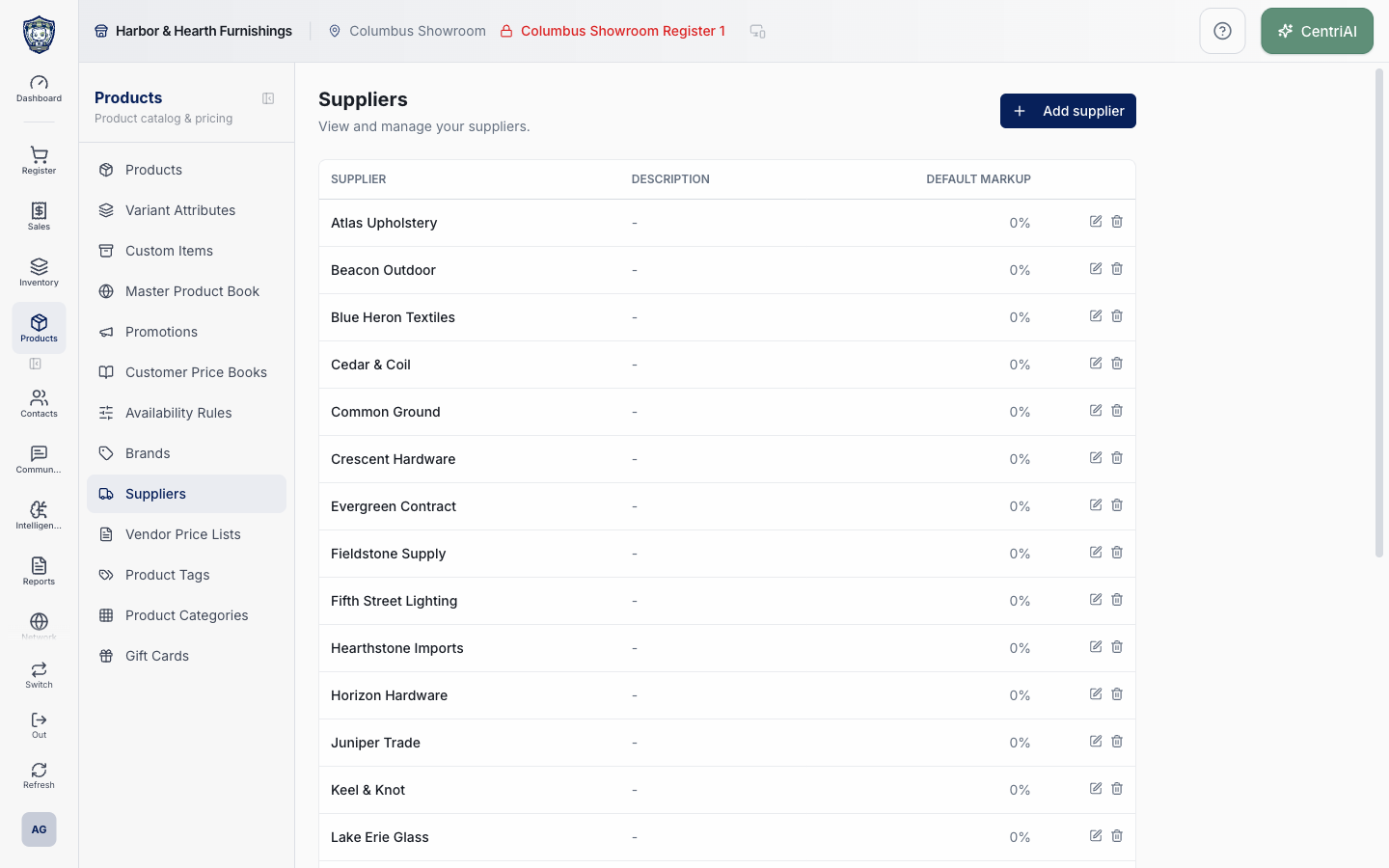
- Go to Products → Suppliers, identified by the Truck icon. The alphabetical tenant list has Supplier, Description, Default markup, edit, and delete columns. There is no list search, filter, pagination, contact column, or email column on this component.
- Wait for the loader to finish. The supplier fetch does not surface its returned error; a failed query can therefore look like No suppliers yet. Refresh and compare a known product/PO supplier before concluding the tenant has none.
- Choose Add supplier, a supplier row, or the pencil. Supplier name is the only field validated as required by this form. Enter a distinct purchasing identity and optional Description. Default markup % is displayed in the list and stored for supported supplier-based pricing behavior; confirm policy before changing it.
- Complete Primary corporate contact: first name, last name, company, primary corporate email, phone, mobile, fax, and website. On a PO, the current supplier email is the first suggested To recipient. It is not automatically protected from editing or guaranteed to be the person who should receive every order.
- Use Sub-contacts for a sales representative, buyer, accounts-payable contact, or email-only recipient. Each retained row can store name, title, email, phone, mobile, notes, and CC this contact on PO emails. Completely blank rows are dropped during save.
- Enable CC this contact on PO emails only when the address should be prefilled in CC for every PO email using this supplier. CentriPOS blocks supplier save if a retained CC-enabled sub-contact has no email. In the PO dialog, non-CC contact emails are suggested in To and CC-enabled contacts in CC; always review the final recipients.
- Complete Street, Street 2, City, State, ZIP code, and Country. These fields support the supplier/vendor identity and printed/accounting context; they do not change the CentriPOS receiving location or a PO’s custom ship-to destination.
- On an existing supplier, review Account fee / surcharge rules. Only nondeleted rules for this supplier appear, newest first. Scope is the listed Categories, Tags, and Brands; no scope IDs means All products for this supplier. The badge says active but its number is the count of nondeleted rules, including rules whose Auto apply switch is off.
- Toggle Auto apply to affect future PO application. Delete soft-deletes the rule and turns auto-apply off; it does not erase prior PO fee evidence. Rules are created from the Purchase Order fee-rule controls, not from a create-rule form in this supplier dialog.
- Review QuickBooks Online vendor. View on QBO appears only when an external vendor URL is already attached. When no link exists, this dialog only explains that supplier sync/matching can create one; it does not provide a manual Match or Create vendor button. Use the QuickBooks integration workflow and verify identity before making accounting changes.
- Use Manage vendor price lists to enter the separate supplier-price-list workflow. Supplier identity alone does not assign products, supplier codes, supply costs, stock, or PO price sources. Verify product-supplier and price-list entries independently.
- Choose Add supplier or Save once. The supplier row is inserted/updated first. CentriPOS then deletes every existing sub-contact for that supplier and inserts the current nonblank draft rows in order. Those writes are not atomic: if contact deletion or reinsertion fails, the supplier fields can already be saved and old contacts can already be gone. Reopen the supplier and verify every recipient before emailing a PO.
- Surcharge rule toggles/deletes are immediate independent writes; closing the supplier dialog does not undo them. View on QBO and Manage vendor price lists navigate away from the identity form. Save pending supplier/contact edits before leaving when they must be retained.
- The trash icon in the supplier list immediately issues a hard delete with no application confirmation dialog and no dependency preflight. Database relationships may block it, or a successful delete may remove the list record immediately. Do not test this control. First inspect products, product-supplier rows, price lists, POs, direct receipts, returns, rules, and accounting linkage, then obtain authorized deletion approval.
- After any create/edit, reopen the supplier and confirm exact name, markup, corporate contact, To/CC sub-contacts/order, address, rule count/scope/auto-apply, QBO link, and price-list navigation. Then open a draft test PO only when authorized and verify suggested To/CC recipients without sending.
- Use the real Amelia Grant Harbor & Hearth screenshot for list orientation. It is the approved loaded `/catalog/suppliers` capture at 1440×900 and exposes supplier names plus public catalog metadata only; no vendor contacts, credentials, costs, QBO record, rule dialog, or mutation is shown.
Screen and contract reference
| Control or area | What it means |
|---|---|
| Truck icon | Exact CentriPOS Products navigation icon for Suppliers. |
| Alphabetical supplier list | Supplier, Description, Default markup, and row actions only. |
| Silent list-query failure | Returned fetch error is not surfaced and can resemble an empty tenant. |
| Supplier name | Only form-validated required identity. |
| Default markup % | Stored supplier-level starting markup used by supported pricing workflows. |
| Primary corporate email | First suggested Purchase Order To address; still review before sending. |
| Sub-contact | Optional name/title/email/phone/mobile/notes/CC recipient row. |
| Blank contact row | Dropped during normalization and not saved. |
| CC this contact on PO emails | Prefills PO CC and requires a contact email. |
| Address | Supplier identity fields; not PO receiving or custom ship-to control. |
| Account fee / surcharge rules | Nondeleted supplier PO fee rules shown newest first. |
| Rule count caveat | Badge counts nondeleted rules even when auto-apply is off. |
| Auto apply | Immediate future-PO rule toggle. |
| Delete rule | Immediate soft-delete and auto-apply disable; prior PO evidence remains. |
| QuickBooks Online vendor | Read-only external link state in this dialog. |
| Manage vendor price lists | Separate supplier-specific product/SKU/cost workflow. |
| Supplier/contact save boundary | Supplier first, then delete-all and reinsert contacts; not atomic. |
| Delete supplier | Immediate hard-delete request with no UI confirmation or dependency preflight. |
| Harbor & Hearth screenshot | Approved real loaded Suppliers list with no sensitive contact/cost exposure or mutation. |
Expected result
The exact supplier identity, default markup, corporate contact, complete ordered To/CC sub-contact set, address, surcharge-rule scope/state, QBO link, and price-list relationship are reopened and verified; representative product and draft-PO selection behave as intended; and any partial supplier/contact replacement or deletion dependency is resolved before retrying.
Troubleshooting
- Confirm the exact product variant and stock location before posting a quantity change.
- Use the movement ledger to identify the source workflow instead of correcting history directly.
- Avoid a manual adjustment when receiving, transfer, count, sale, or return is the correct workflow.
CentriPOS API explorer · API Center administration